MathsEasyAsPie.com
  • Home
  • Number
    • Whole Numbers
    • Multiples and Factors
    • Surds
  • Algebra
    • Terms, Expressions and Equations
    • Like Terms
    • Expanding Brackets
  • Calculus
  • Graphs
  • Exam
  • Shorts
    • Expanding Brackets (shorts)
    • Calculus (shorts)
  • Misc Video Index
  • Python
  • Computing
  • Contact

Expanding Brackets Exercises


Scroll down to view and complete the exercises and watch the video solutions to learn several bracket expansion methods..

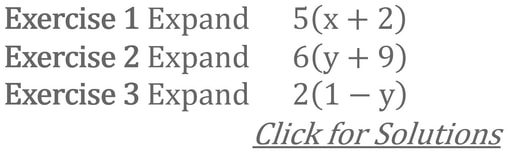
Exercise 1 to 3 and Video Solution
Picture
Note: Pressing the letter f on the keyboard alternates the video back and forth to full screen.

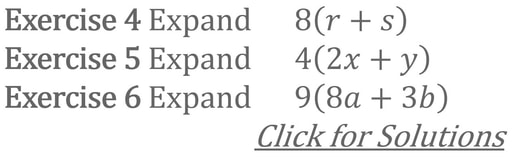
Exercise 4 to 6 and Video Solution

Picture
Note: Pressing the letter f on the keyboard alternates the video back and forth to full screen.

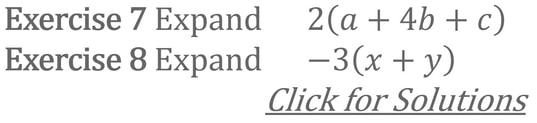
Exercise 7 to 8 and Video Solution

Picture
Note: Pressing the letter f on the keyboard alternates the video back and forth to full screen.

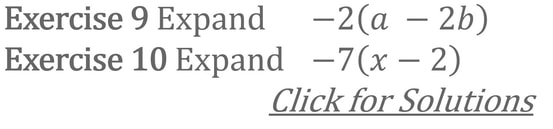
Exercise 9 to 10 and Video Solution

Picture
Note: Pressing the letter f on the keyboard alternates the video back and forth to full screen.

Exercise 11 to 12 and Video Solution

Picture
Note: Pressing the letter f on the keyboard alternates the video back and forth to full screen.

Exercise 13 to 14 and Video Solution

Picture
Note: Pressing the letter f on the keyboard alternates the video back and forth to full screen.

Exercise 15 to 16 and Video Solution

Picture
Note: Pressing the letter f on the keyboard alternates the video back and forth to full screen.

Exercise 17 to 18 and Video Solution

Picture
Note: Pressing the letter f on the keyboard alternates the video back and forth to full screen.

Expanding Brackets Exercises using FOIL


Exercise 1 to 2 and Video Solution

Picture
Note: Pressing the letter f on the keyboard alternates the video back and forth to full screen.

Exercise 3 to 4 and Video Solution

Picture
Note: Pressing the letter f on the keyboard alternates the video back and forth to full screen.

Exercise 5 to 6 and Video Solution

Picture
Note: Pressing the letter f on the keyboard alternates the video back and forth to full screen.


Exercise 7 to 8 and Video Solution

Picture
Note: Pressing the letter f on the keyboard alternates the video back and forth to full screen.

Product of Two Binomial Expressions


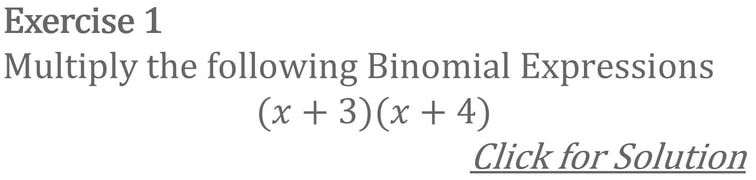
Exercise 1 and Video Solution
Picture
Note: Pressing the letter f on the keyboard alternates the video back and forth to full screen.

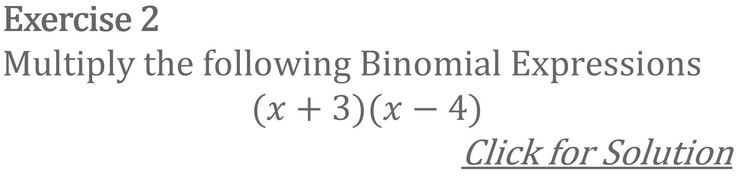
Exercise 2 and Video Solution

Picture
Note: Pressing the letter f on the keyboard alternates the video back and forth to full screen.

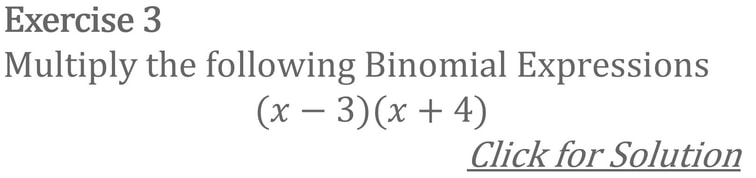
Exercise 3 and Video Solution

Picture
Note: Pressing the letter f on the keyboard alternates the video back and forth to full screen.

Exercise 4 and Video Solution

Picture
Note: Pressing the letter f on the keyboard alternates the video back and forth to full screen.

Exercise 5 and Video Solution

Picture
Note: Pressing the letter f on the keyboard alternates the video back and forth to full screen.

Exercise 6 and Video Solution

Picture
Note: Pressing the letter f on the keyboard alternates the video back and forth to full screen.

Exercise 7 and Video Solution

Picture
Note: Pressing the letter f on the keyboard alternates the video back and forth to full screen.

Expanding Brackets using Visual Cues 


Exercise 1 and Video Solution

Picture
Note: Pressing the letter f on the keyboard alternates the video back and forth to full screen.

Exercise 2 and Video Solution

Picture
Note: Pressing the letter f on the keyboard alternates the video back and forth to full screen.

Exercise 3 and Video Solution

Picture
Note: Pressing the letter f on the keyboard alternates the video back and forth to full screen.

Exercise 4 and Video Solution

Picture
Note: Pressing the letter f on the keyboard alternates the video back and forth to full screen.

Donate to support the website >>